
Tradeit.gg
Quick Overview
Tradeit.gg is a bot-based CS2 skin marketplace that allows users to instantly trade, buy, sell, and cash out skins without waiting for manual buyers. Launched in 2017, it operates primarily through automated trading bots, which means transactions are completed in seconds rather than hours or days. The platform supports CS2, Rust, TF2, and other Steam items, but CS2 is clearly its main focus.
Unlike peer-to-peer marketplaces where you list items and wait for someone to purchase them, Tradeit.gg focuses on speed and liquidity. You can sell a skin directly to a bot for instant balance, trade items across games, or use the insta-sell feature for immediate payout at a reduced rate. It also supports crypto and bank withdrawals, though cashouts follow a protection window before processing (7 days from the moment of sale).
Tradeit.gg is best suited for users who value fast execution and convenience over getting the absolute lowest fees. If you want to flip skins quickly, move inventory without delays, or convert items into cash without managing listings, the platform makes that process simple. However, traders who are highly fee-sensitive or dealing with very high-value skins may find better net returns on lower-commission peer-to-peer marketplaces.
Fees
Before using any CS2 marketplace, understanding the full fee structure is critical. Tradeit.gg is not the cheapest platform on the market, but it positions itself as a fast, automated alternative to peer-to-peer marketplaces. You’re paying for instant liquidity and bot-based execution.
Below is a breakdown of all major fees based on platform data and real trading tests.
| Fee Type | Cost | Details |
|---|---|---|
| Buyer Fee | Built into item price | No separate fee shown — the listed price already includes Tradeit’s margin |
| Trading Fee | From 5% to 20% | Varies by item value and category; higher-value items often face higher percentage cuts |
| Deposit Fee | From 0% to 3.1% | Crypto: 0% • Credit/Debit Card & PayPal (via Kinguin): 3.1% |
| Withdrawal Fee | From 0% to 2% | Crypto: 2% • Bank transfer: 2% • Internal balance transfers: 0% |
| Insta-Sell Rate | ~83% of Cash value | Instant credit option; significantly lower payout compared to standard selling |
What This Means in Practice
If you sell a $100 CS2 skin through the regular marketplace, you’ll typically receive between $87 and $91.50 before withdrawal fees. If you withdraw via crypto or bank transfer, another 2% applies.
Using insta-sell on that same $100 item would return roughly $83 in instant balance — much faster, but at a steep discount.
Compared to Steam’s 15% marketplace fee, Tradeit.gg is cheaper. However, compared to low-fee peer-to-peer markets (2–5%), it’s noticeably more expensive. The tradeoff is speed: trades complete in seconds, and you don’t need to wait for a buyer.
If your priority is instant execution and simple automation, the fees may feel reasonable. If maximizing profit margin is your main goal, other marketplaces may offer better returns.
Is Tradeit.gg Legit?
Yes, Tradeit.gg is a legitimate CS2 skin marketplace that has been operating since 2017. It uses automated trading bots to handle transactions and has processed millions of trades over the years. While no third-party marketplace is risk-free, Tradeit.gg is widely recognized within the CS2 trading community.
Years in Operation
Tradeit.gg launched in 2017, which gives it nearly a decade of market presence. In the skin trading space, longevity matters. Many scam sites disappear within months, so multi-year operation is a strong trust signal.
Community Reputation
Tradeit is generally viewed as a fast and reliable bot marketplace. It’s often compared to platforms like CS.MONEY and DMarket in discussions about speed and liquidity. The platform handles high trading volume and maintains an active user base.
That said, most criticism focuses on fees — not legitimacy. Users commonly mention that insta-sell rates are low and seller fees can feel high, especially on expensive items.
Trustpilot Score
Tradeit.gg holds a 4.7 / 5 rating on Trustpilot based on over 19,000 reviews, which is considered strong for a skin marketplace. Most positive reviews mention fast trades, responsive support, and smooth withdrawals. Negative reviews usually relate to verification delays or withdrawal waiting periods.
Reddit Feedback
On Reddit, feedback is mixed but mostly practical. Users confirm that trades are fast and bots function reliably. Complaints typically center around:
- Insta-sell payouts being lower than expected
- Withdrawal waiting periods (7–10 days)
- Deposit verification delays with certain payment providers
There are no widespread accusations of exit scams or mass fund freezes — which is important when evaluating legitimacy.
Known Scams Associated with Tradeit.gg
There are no confirmed large-scale scams directly tied to the official Tradeit.gg platform. However, like all popular marketplaces, phishing attempts exist. Fake domains and impersonation bots sometimes target users. The main risk comes from users clicking the wrong link or interacting with fake trade offers outside the official site.
As long as you:
- Use the correct domain (tradeit.gg)
- Verify bot trade URLs
- Enable Steam Guard
The platform itself is considered safe to use.
Payment Methods at Tradeit.gg
Tradeit.gg supports both deposits and withdrawals, but the flow is important to understand. You can deposit funds or skins to build balance and buy items. However, deposited cash balance cannot be withdrawn directly — you must first purchase and sell items to move funds into your withdrawable revenue balance.
Below is a clear breakdown of available payment methods and what they support.
Deposit Methods
| Method | Deposit | Withdrawal | Fees | Notes |
|---|---|---|---|---|
| Credit / Debit Card | ✅ Yes | ❌ No | 3.1% | May require bank statement verification code |
| PayPal (via Kinguin) | ✅ Yes | ❌ No | 3.1% | Availability depends on region |
| Crypto (BTC, ETH, USDT) | ✅ Yes | ✅ Yes | 0% deposit / 2% withdrawal | Must use correct blockchain network |
| Skins (Bot Deposit) | ✅ Yes | ❌ Direct | 0% | Standard 7-day Steam trade lock applies |
Withdrawal Methods
| Method | Deposit | Withdrawal | Fees | Timeline |
|---|---|---|---|---|
| Crypto | ✅ Yes | ✅ Yes | 2% | Typically 7–10 days total (after protection window) |
| Bank Transfer | ❌ No | ✅ Yes | 2% | 7–10 days (eligible countries only) |
| Internal Balance Transfer | N/A | ✅ Yes | 0% | Instant within platform |
| Withdraw to Steam (skins) | N/A | ✅ Yes | 0% | After Steam trade lock ends |
Important Things to Know
- There is a 7-day protection period before sold-item funds become withdrawable.
- Deposited cash cannot be withdrawn directly — you must trade items first.
- Bank withdrawals are limited to specific countries (US, CA, UK, EU, AU, SG, MX, IL).
- Crypto is generally the fastest and most flexible withdrawal method.
If you plan to deposit frequently, crypto avoids the 3.1% card fee. If you plan to cash out often, factor in the 2% withdrawal fee and the protection window.
Tradeit.gg offers solid payment flexibility, but understanding the flow prevents surprises later.
Final Verdict: Is It One of the Best Places to Buy CS2 Skins?
Tradeit.gg is one of the fastest bot-based marketplaces available, but whether it’s one of the best places to buy CS2 skins depends on what you value most.
If speed, instant trades, and automation matter more than squeezing every last percentage point out of fees, Tradeit.gg performs very well. Trades complete in seconds, inventory depth is strong (around 350,000 skins listed), and the 4.7/5 Trustpilot score shows consistent user satisfaction. The platform also supports crypto withdrawals and cross-game trading, which adds flexibility.
However, it is not the cheapest option. Seller fees range from 8.5% to 13%, and insta-sell returns average around 55–61% of Steam value. There is also a 7-day protection window before withdrawals are processed. Fee-sensitive traders or users flipping high-value skins may find better net returns on lower-commission peer-to-peer marketplaces.
Who Should Use Tradeit.gg
- Traders who want instant execution
- Users who prefer bot-based automation over manual listings
- Players who want cross-game trading (CS2, Rust, TF2)
- Users comfortable with a 7–10 day withdrawal timeline
Who Should Avoid It
- Traders focused strictly on lowest possible fees
- High-volume flippers operating on thin margins
- Users who need immediate same-day bank withdrawals
- Buyers who want full P2P price control
Overall, Tradeit.gg is strong in speed, reliability, and liquidity. It may not be the absolute cheapest option, but it remains a competitive choice among the best places to buy CS2 skins if convenience and fast trades are your priority.
How To Get Started with Tradeit.gg
Setting up took me about 12 minutes start to finish—not bad at all. You'll need your Steam account, Steam Guard Mobile Authenticator (mandatory), and access to your email and phone. Once those are sorted, you can start trading immediately. Full verification unlocks withdrawals and higher limits, but basic trading works right out of the gate. These are the 5 steps you need to follow.
Steam Account, Email, Phone
Computer Device
-
1

Link Your Steam Account
Head to Tradeit.gg, click "Sign in with Steam", and authenticate through Steam's official page. No separate registration form, no password creation—just straight Steam OAuth. After linking, you'll drop in your email for trade notifications and bonus offers. Confirmation email arrived in under a minute for me. Once you're in, you can browse, trade with bots, and explore instant-sell immediately. Works globally, though some payment processors have regional restrictions.
-
2

Handle Verification
Tradeit uses tiered verification based on what you're trying to do. Basic Steam login gets you trading access instantly. Want to withdraw to a bank or card? You'll need to upload ID—passport, driver's license, or government-issued card. My verification went through in about 8 minutes (automated system), though manual reviews can stretch to 30+ minutes during peak times. Higher verification tiers unlock better limits and additional payment methods like PayPal or direct bank transfers.
-
3

Lock Down Security
Before trading anything valuable, double-check your Steam trade URL in your Tradeit account settings. This is how the bots send and receive items—get it wrong, and trades fail. Make sure Steam Guard Mobile Authenticator is active (required for any item transfers), and consider enabling 2FA for crypto transactions. Takes an extra 30 seconds per trade, but prevents a lot of potential headaches.
-
4

Run a Test Trade
Start small. I threw a $7 skin at the system first, just to see how it handled. Pick an item, confirm the bot offer in Steam, and watch it complete in about 8-10 seconds. Seriously. I was still reading the confirmation dialog when the item hit my inventory. Selling works the same way—instant credit, on-screen confirmation, all fees displayed upfront. No surprises, no hidden charges.
-
5
Set Up Cash-Outs
Once you've got balance sitting there, head to Wallet → Withdraw. Tradeit supports crypto, bank, card, and skin withdrawals. Crypto moved fastest in my tests—5 to 15 minutes consistently. Bank and card payouts? 1-2 business days, sometimes longer depending on your bank. First-time withdrawals (especially bank transfers) might trigger additional verification checks, so don't panic if there's a delay.
Common Questions About Tradeit.gg
-
Can You Get Banned for Using Tradeit.gg?
-
Does Tradeit.gg Require KYC?
-
How Long Do Withdrawals Take?
DMarket
Quick Overview
DMarket is a peer-to-peer CS2 skin marketplace launched in 2017 that allows users to buy and sell skins directly with other players. Instead of acting as an instant trade platform that buys items from you at a fixed price, DMarket works as an open listing market. Sellers set their own prices, buyers choose the best offers, and the platform takes a small transaction fee from both sides.
With around 2.6 million monthly visits and more than 1.3 million skins listed, DMarket is one of the largest active marketplaces outside of Steam. It supports CS2, Dota 2, TF2, and Rust under a single account, which makes it convenient for users who trade across multiple games.
DMarket is best suited for users who care about low fees and higher final payouts rather than instant speed. Active traders, skin flippers, and players selling higher-value items benefit the most from its 2% seller fee, which is significantly lower than Steam’s 15% cut and cheaper than many instant-trade competitors. Buyers also benefit from competitive pricing since listings are user-driven.
It may not be ideal for users who want instant cashouts or immediate skin swaps. Because it operates as a peer-to-peer market, sales depend on real buyer demand, which means waiting times can range from minutes to hours depending on price and liquidity.
In short, DMarket is designed for cost-focused traders who prioritize value over speed.
Fees
One of the main reasons traders choose DMarket is its low and transparent fee structure. Compared to Steam and most instant-trade marketplaces, the platform keeps costs relatively small, especially for sellers. However, the total amount you pay depends on whether you are buying, selling, depositing funds, or withdrawing money.
Below is a clear breakdown of all standard fees associated with using DMarket.
| Fee Type | Cost | Details |
|---|---|---|
| Seller Fee | 2% | Flat fee on every completed sale |
| Buyer Fee | 2.5% | Added to the item price at checkout |
| Deposit Fee | 0–3.9% | Depends on payment method (cards higher, crypto lower, Uphold 0%) |
| Withdrawal Fee | 0–2% | Varies by method (Payoneer 0%, crypto ~1.5–2%, SWIFT flat fee) |
| Instant Sell | Not Available | Marketplace operates as P2P only |
Seller Fee
DMarket charges a flat 2% fee when your item sells. This is one of the lowest seller fees among major CS2 marketplaces. For example, selling a $100 skin results in a $2 fee, leaving you with $98 before withdrawal costs.
Buyer Fee
Buyers pay an additional 2.5% on top of the listed item price. If a skin is listed for $100, the final checkout price becomes $102.50 before any deposit processing fees.
Deposit Fees
Deposit fees depend entirely on the payment method. Credit and debit cards typically carry fees around 3.5% to 3.95%. Crypto deposits are usually around 2%. Uphold deposits may have 0% fees in supported regions. These fees apply when adding funds to your account balance.
Withdrawal Fees
Withdrawal costs vary based on the method selected. Payoneer withdrawals can be 0%. Visa withdrawals may include a small percentage plus a fixed fee. Bitcoin withdrawals are typically around 1.5%, while some crypto methods reach 2%. Bank transfers such as SWIFT may include a flat fee, which only makes sense for larger withdrawals.
Overall, DMarket remains one of the cheapest options for active traders, especially those focused on selling high-value skins and minimizing long-term fee impact.
Is DMarket Legit?
Yes, DMarket is a legitimate CS2 skin marketplace that has been operating since 2017. It is one of the longer-running third-party platforms in the space and processes millions of monthly visits, which adds a layer of operational credibility.

Years in Operation
DMarket launched in 2017, giving it over 8 years of history in the skin trading market. Longevity matters in this niche, as many smaller marketplaces disappear within a few years. DMarket’s continued operation suggests financial stability and consistent user demand.
Community Reputation
Within the trading community, DMarket is generally known for its low seller fees and large inventory. Active traders often recommend it for higher-value items where saving a few percentage points makes a noticeable difference. However, some users mention that the interface can feel confusing at first, especially for beginners.
Trustpilot Score
DMarket holds a Trustpilot rating of 4.0 out of 5 based on more than 20,000 reviews. This is considered solid for a skin marketplace, where payment issues or trade misunderstandings often lead to negative feedback. Most positive reviews mention smooth transactions and successful withdrawals, while negative ones typically involve KYC delays or account verification concerns.
Reddit Feedback
On Reddit, feedback is mixed but generally positive. Experienced traders acknowledge that DMarket is legitimate and pays out, but they also point out that it is not an instant platform. Complaints usually relate to verification checks, occasional support delays, or confusion around withdrawal methods rather than fraud.
Known Scams Associated with the Marketplace
There are no widespread reports of DMarket itself running scams. Most scam reports connected to the brand involve impersonation attempts, phishing links, or fake support messages sent outside the official website. As with any third-party marketplace, users should only access the platform through the official domain and enable Steam Guard for account security.
Overall, DMarket is considered a legitimate peer-to-peer marketplace with a solid track record. While no third-party trading site is completely risk-free, DMarket has established itself as one of the more stable and trusted options in the CS2 skin market.
Payment Methods at DMarket
DMarket uses a wallet-based system. You deposit funds into your DMarket balance, buy skins from other users’ listings, and withdraw money after you sell items. Available payment options depend on your region and, for some withdrawal methods, whether you complete verification.
| Payment Method | Deposit | Withdraw | Key Details (Fees / Notes) |
|---|---|---|---|
| Visa / Mastercard (incl. Apple Pay, Google Pay) | Yes | No | Deposit fee about 3.5% + $0.25; deposit limits can apply |
| American Express | Yes | No | Availability can vary by region and provider |
| Maestro | Yes | No | Card deposits; fee depends on region/provider (often similar to other cards) |
| Crypto (BTC, ETH, USDT, SOL, etc.) | Yes | Yes | Deposit fee around 2%; withdrawals vary (Bitcoin often ~1.5%, USDT options can be ~2% depending on network) |
| PayPal | Yes | Yes | Withdrawal available; fee depends on payout route and region |
| Payoneer | No | Yes | Withdrawal fee can be 0%; often one of the cheapest cashout options |
| Skrill | Yes | No | Deposit fee about 3.9% + $0.13; deposit limits can apply |
| Neteller | Yes | No | Deposit fee about 3.9% + $0.13; deposit limits can apply |
| RapidTransfer | Yes | No | Deposit fee about 2% + $0.13; deposit limits can apply |
| Uphold | Yes | No | Deposit fee can be 0% in supported regions; higher limits where available |
| ACH (via payout provider) | No | Yes | Flat fee (example: about $1.27); availability can vary |
| SWIFT Bank Transfer | No | Yes | Flat fee (example: about $19.02); best for larger withdrawals |
| G2A Gift Card | Yes | No | Deposit fee can be 0%; typically lower limits (example: up to $250) |
| Kinguin (gift card/top-up) | Yes | No | Availability varies; fees and limits depend on provider |
This table shows which methods you can use to deposit funds and which ones are available for withdrawals. Unlike some marketplaces that restrict PayPal to cashouts only, DMarket allows users in supported regions to buy CS2 skins with PayPal by depositing funds through compatible payment routes. That makes it a practical option for players who prefer PayPal over cards or crypto when funding their balance.
If PayPal is your main payment method, DMarket can fit well into a list of marketplaces that support PayPal deposits, especially compared to platforms that only allow crypto or card payments. At the same time, withdrawal availability and limits may depend on your account verification status and country.
As always, fees and limits can vary based on region and provider integrations, so it’s important to check the exact cost breakdown inside your account before completing large deposits or withdrawals.
Final Verdict: Is It One of the Best Places to Buy CS2 Skins?
DMarket is one of the strongest options for users who prioritize low fees and competitive pricing over instant speed. With a 2% seller fee and 2.5% buyer fee, it remains cheaper than most major competitors, especially compared to Steam’s 15% cut. The large inventory and steady monthly traffic also mean buyers can often find skins listed below Steam Market prices.
Who should use DMarket?
Active traders, value-focused buyers, and sellers moving mid to high-tier skins will benefit the most. If you are willing to wait for a buyer match and care about maximizing payout rather than selling instantly, DMarket makes financial sense. It is also a solid choice for users who want multiple deposit and withdrawal options, including crypto and PayPal in supported regions.
Who should avoid it?
If you want instant trades, guaranteed fast sales, or fixed-price cashouts within seconds, DMarket may feel slow. Since it operates as a peer-to-peer marketplace, liquidity depends on demand. Casual users selling one low-value skin and expecting immediate results may prefer instant-trade platforms instead.
Overall, DMarket earns its place among the best places to buy CS2 skins, particularly for users who value lower fees and competitive listings. It is not the fastest marketplace, but for cost-conscious traders, it remains one of the most efficient long-term options.
How To Get Started with DMarket
Getting started with DMarket is straightforward, but there are a few important steps to complete before you can trade smoothly. You’ll need a Steam account, a valid email address, and access to your Steam Guard Mobile Authenticator. If you plan to withdraw funds using certain payment methods, identity verification may also be required.
Steam Account, Email addres
Computer Device (Mobile, Tablet, Computer)
-
1

Sign In with Steam
Go to the official DMarket website and click “Sign in with Steam.” You’ll be redirected to Steam’s secure login page to authorize the connection. Once approved, your Steam inventory will sync automatically with DMarket.
-
2

Confirm Your Email
After logging in, confirm your email address. This activates your account fully and allows you to start buying or listing skins.
-
3
Set Up Security and Trade URL
Add your Steam trade URL inside your profile settings. Make sure Steam Guard Mobile Authenticator has been active for at least 7 days to avoid Steam trade holds. Enabling two-factor authentication for your DMarket account is also recommended for extra protection.
-
4
Deposit Funds (If Buying)
If you want to buy skins, deposit funds into your DMarket wallet using your preferred payment method. Options may include cards, crypto, PayPal in supported regions, and various e-wallets. The balance will update once the transaction clears.
-
5

List or Buy Skins
To sell, select an item from your synced inventory, set your price, and confirm the listing. Since DMarket is peer-to-peer, you’ll wait for a buyer to match your price. To buy, browse listings, complete checkout using your wallet balance, and accept the Steam trade offer once it arrives.
-
6
Withdraw Your Funds
After selling items, go to the withdrawal section, select your payout method, and enter the required details. Some withdrawal options may require identity verification before your first cashout.
Common Questions About DMarket
-
Can You Get Banned for Using DMarket?
-
Does DMarket Require KYC?
-
How Long Do Withdrawals Take?
Skinswap
Skinswap Review Summary
Skinswap’s pitch is simple: three ways to move items in one spot (store, bot trading, insta-sell) with quick quotes and clear costs. In my runs, the trading fee bands matched what was shown: 10 to 14% on buyer side (my $5, $55, $200, and $700 tests mapped to 10%, 12%, 14%, 14%). Insta-sell hovered around about 60% of item value by tier (55 to 62%). Funding stayed cheap to free (crypto and Kinguin at $0, cards or CashApp at $0.30). Cashing out gave options: crypto micro-fees from $0 to $0.05, PayPal at 2% + $0.25, prepaid higher.
This setup fits anyone who values fast turnover more than perfect pricing: move a mid or high-mid skin at around 60% without babysitting listings, run a single-session bot swap, or keep friction low with 0% crypto deposits plus quick crypto withdrawals. If your priority is squeezing every last percent, a low-fee P2P might be better on the buy side since 10 to 14% adds up. If you want speed and certainty, Skinswap is an easy pick. For comparisons across markets, see my broader cs2 skins market reviews.
Fees
| Transaction Type | Fee | Details |
|---|---|---|
| Buyer Fee (trading/store/bot) | 10 to 14% | Tiers shown in-app; examples: $5 -> 10%, $55 -> 12%, $200 -> 14%, $700 -> 14% (captured during testing). |
| Seller Fee (listing) | Not publicly disclosed | Store/bot model for trading. Insta-sell pays a quote instead of a fee (see below). |
| Insta-Sell Payout (seller) | ~55 to 62% of item value | Tiers observed: low 62%, mid 60%, high-mid 60%, high 55% (avg about 60%). |
| Withdrawal | $0 to 3.4% / fixed | PayPal 2% + $0.25, Venmo 2% + $0.25, Prepaid 3.4% + $3, BTC $0.93, LTC $0, ETH/USDT/USDC (ERC-20) $0.05. |
| Deposit | $0 to $0.30 | Crypto (Coinbase) $0, Kinguin gift cards $0, Credit/Debit $0.30, CashApp $0.30. |
Source: live quotes from the Skinswap interface during my tests (Oct 4 to 6, 2025). The site confirms available payment and withdrawal rails (PayPal, cards, crypto), but a single consolidated fee page is not publicly disclosed.
Practical example. If you insta-sell a $100 skin at the typical $60 quote, a USDC (ERC-20) cash-out costs $0.05, leaving $59.95. Choosing PayPal at 2% + $0.25 leaves $58.55. On the buy side, a $100 trading purchase with a 12% buyer fee totals $112. Card deposits add $0.30; crypto deposits add $0.
Competitive context. The 10 to 14% buyer fee is higher than some trading-bot or P2P routes with 0% buyer costs, but Skinswap gives you inventory breadth, instant quotes, and quick exits. If low buy-side fee is the only goal, look elsewhere. If you need speed and inventory in one screen, this pricing will make sense.
How To Get Started with Skinswap
Total setup time is about 10 to 15 minutes. Have your Steam account, email, and phone ready. If you plan to use crypto, keep a wallet address handy. For PayPal or Venmo, make sure those accounts are active.
- Create Your Account
Open an account with your email and password, then connect Steam so Skinswap can read your inventory (needed for store, bot trades, and insta-sell). A verification email arrived for me in about a minute. After basic sign-up you can browse prices, pull bot quotes, and preview insta-sell offers. Some payment options appear only in supported regions. - Complete Identity Verification
Requirements depend on how you plan to move money. For fiat rails like PayPal or Venmo, expect a government ID and basic profile details. For crypto, add and confirm a wallet address. My approval was automated and finished within minutes; manual review can take longer. Higher tiers unlock larger limits and more withdrawal choices. - Configure Security Settings
Add your Steam Trade URL and enable the Steam Mobile Authenticator to confirm trades. Turn on 2FA for your Skinswap login and the email tied to the account. These steps keep trade approvals in your hands and reduce failures or delays. - Make Your First Transaction
Start small to learn the flow, about $5 to $20. You can buy from the store, run a bot trade, or request an insta-sell quote. The checkout shows totals and route fees before you click confirm. Steam handles delivery; most confirmations wrapped up for me within a few minutes. - Set Up Withdrawal Methods
Add at least one payout you will actually use (for example crypto, PayPal, Venmo, or Skins). Some methods ask for a name or account match step. Crypto payouts usually move in minutes. Fiat rails can take longer and include fixed or percent charges. The first payout can take extra time due to checks.
Pro Tips
- Run verification earlier in the day for faster automated passes.
- Double-check your Steam Trade URL. Typos are a common source of failed trades.
- Do a tiny test buy or sell before moving higher-value items.
- Keep Steam Mobile Authenticator and 2FA on to avoid approval delays.
Payment Methods at Skinswap
Skinswap runs a hybrid flow. You can deposit cash to buy from the store or trade with bots, and you can insta-sell items for a cash payout that the site says is typically issued within about 60 seconds after you confirm the trade. For buying, funding options include cards, PayPal, and crypto. For selling, cash-outs are available to PayPal and cryptocurrencies.
Deposit Methods
You can fund your balance through the usual rails, or come in skin-first by listing or using insta-sell. For store purchases you will need cash funding. Product and help pages list Credit/Debit cards, PayPal, Kinguin gift cards, and crypto (BTC, ETH, LTC). A single official page with all deposit fees and limits is not published.
| Method | Fee | Processing Time | Minimum/Maximum |
|---|---|---|---|
| Credit/Debit Card | Not publicly disclosed | Minutes (standard checkout) | Not publicly disclosed |
| PayPal | Not publicly disclosed | Minutes | Not publicly disclosed |
| Kinguin Gift Cards | Not publicly disclosed | Minutes | Not publicly disclosed |
| Cryptocurrency (BTC/ETH/LTC) | Network fees apply; site fee not publicly disclosed | Minutes after network confirmation | Not publicly disclosed |
Tip: if you already hold crypto, funding with BTC, ETH, or LTC avoids card or PayPal handoffs and usually clears as soon as the network confirms, which is useful when you want to grab a listing quickly.
Withdrawal Methods
Payouts line up with the rails the site highlights: PayPal and crypto. The sell pages note that instant-sell payouts can arrive within about 60 seconds after you confirm the trade, with the method chosen at checkout. A single official withdrawal-fee table is not published, and any minimums are not listed centrally.
| Method | Fee | Processing Time | Minimum Withdrawal | Requirements |
|---|---|---|---|---|
| PayPal | Not publicly disclosed | About 60 seconds post-confirm for instant-sell, then normal PayPal timing | Not publicly disclosed | Verified PayPal account |
| Bitcoin (BTC) | Not publicly disclosed (network fees apply) | Minutes after on-chain confirmation | Not publicly disclosed | Wallet address |
| Ethereum (ETH) | Not publicly disclosed (network fees apply) | Minutes after on-chain confirmation | Not publicly disclosed | Wallet address |
| Litecoin (LTC) | Not publicly disclosed (network fees apply) | Minutes after on-chain confirmation | Not publicly disclosed | Wallet address |
If speed is the only goal, crypto is usually the quickest once the transaction is broadcast. If you want fiat you can spend right away, PayPal is convenient, though its own fees or holds are separate from Skinswap. Pick the route that matches your timeline and cost tolerance.
Regional Considerations
Skinswap presents global availability with localized pages. Actual payment options can vary by country and provider. If a card processor or PayPal is not shown in your checkout, crypto is usually the most universal path. CS2 and Rust activity is available wherever Steam tradeability applies.
What Games Are Supported on Skinswap?
Skinswap trades Counter-Strike 2 (CS2) as the primary focus and also supports selling Rust skins. For CS2, the platform processes market-tradeable skins through Steam. For Rust, support is specifically for skins as well. Items must be Steam-tradeable; items on hold, region-locked, or non-tradeable are not processed until eligible. Cases, capsules, and stickers are not listed here, and any StatTrak-specific limitations are not published by Skinswap.
CS2 activity is available in all three modes (store, bot trading, insta-sell). Rust is available for skin sales. No extra regional game restrictions are stated beyond Steam’s own trade rules, though payment rail availability can still change by country.
FAQ About Skinswap
-
Is Skinswap legit and safe to use?
-
What’s the seller fee on Skinswap?
-
What’s the buyer fee on Skinswap?
-
What’s the withdraw fee on Skinswap?
-
Does Skinswap have a mobile app?
iTrade.gg
Quick Overview
iTrade.gg is a CS2 and Rust skin trading marketplace that operates using automated trade bots. Instead of traditional cash deposits and bank withdrawals, the platform focuses entirely on skin-to-skin trading.
Launched in 2020 and based in the USA, iTrade.gg offers access to around 160,000 skins, mainly for Counter-Strike 2 and Rust. With roughly 77,000 monthly visits, it sits in the mid-sized marketplace category.
This platform is best suited for:
- Players who want to trade skins quickly without waiting for buyers
- Users who prefer bot-based instant trades
- Traders who mainly operate within the Steam ecosystem
- CS2 and Rust players looking for variety without cashing out to fiat
It is not ideal for users who want direct bank withdrawals or card deposits, since the marketplace works through skins rather than traditional payment methods.
Fees
Understanding the fees at iTrade.gg helps you know how much value you keep from each trade. Unlike cash-based marketplaces, iTrade.gg uses bot trading, so most costs are built into trade value differences rather than shown as a simple percent at checkout. Below is a clear breakdown of all known fees, including buyer costs, seller costs, deposit and withdraw fees, and how much you get if you use the insta sell feature.
| Fee Type | What It Is | Amount / Notes |
|---|---|---|
| Buyer Fee | The hidden cost you pay when buying skins through bot trades. This shows up as a markup between what you give and what you receive. | Not publicly listed as a fixed percent; embedded in trade value differences. |
| Seller Fee | The implicit fee when you trade your skin into the bot for another item — the bot pays less than market value. | Not a stated flat percent; reflected in trade value difference. |
| Trading Fee | The overall difference in value between skins you send and receive through bots. | ~7% average value difference based on how the bot pricing works. |
| Insta Sell Fee | If you use any sell-now option, this is how much iTrade.gg pays compared to Cash value. | Around 82% of Cash value. |
| Deposit Fee (Fiat) | Charge for adding funds with a credit/debit card via Stripe (if available). | 2.9% + $0.25 per transaction. |
| Withdraw Fee | Cost to pull skins back into your inventory from the site. | $0.30 worth of inventory. |
Notes on Fees
- Bot pricing differences act as both buyer and seller fees since there is no separate listed cut — the bot always offers slightly less value than the Cash price.
- The insta sell percentage shows you how much you get if you choose to sell your skin directly without trading for another item.
- Traditional deposit methods like card are available only for adding funds, with standard payment processor fees.
This structure makes iTrade.gg more like a trading hub than a classic buy/sell marketplace, so always check trade offers carefully before accepting.
Is iTrade.gg Legit?
Yes, iTrade.gg is a legitimate skin trading marketplace, but like any CS2 trading site, it’s important to understand how it operates and what users say about it.
Here’s a clear breakdown of trust factors:
Years in Operation
iTrade.gg launched in 2020 and has been active for several years. A multi-year track record is generally a positive sign in the skin trading space, where short-lived scam sites are common.
Community Reputation
The platform is known mainly for bot-based trading rather than cash transactions. Among trading-focused users, it has a reputation for:
- Fast automated trades
- Large skin inventory (around 160,000 skins)
- Straightforward Steam integration
It is less known than major marketplaces, but it maintains steady traffic (about 77,300 monthly visits).
Trustpilot Score
- 4.8 out of 5 stars
- Based on 117 reviews
This is a very strong rating. However, the review count is still relatively small compared to larger marketplaces with thousands of reviews.
Reddit Feedback
Reddit discussions generally describe iTrade.gg as:
- Reliable for quick trades
- Best for swapping skins rather than cashing out
- Important to double-check trade values before confirming
As with most trading sites, users advise carefully reviewing each bot offer inside Steam.
Known Scams Associated with iTrade.gg
There are no major, widely reported scam cases directly tied to iTrade.gg itself.
That said, common risks in the CS2 marketplace ecosystem include:
- Fake impersonator bots
- Phishing websites copying marketplace branding
- Trade URL hijacking scams
These risks are not unique to iTrade.gg — they exist across all skin trading platforms. Always verify:
- The official domain (itrade.gg)
- The bot’s Steam profile
- The trade offer details before accepting
Overall, based on years active, strong Trustpilot rating, and lack of major controversy, iTrade.gg appears to be a legitimate platform for skin trading.
Payment Methods at iTrade.gg
iTrade.gg works differently from many large cash marketplaces. It is primarily a skin-to-skin trading platform, meaning most transactions happen through Steam trade offers rather than traditional payment systems.
Still, it’s important to understand exactly what you can use to deposit and what you can use to withdraw.
Here’s a clear breakdown:
| Payment Method | Deposit Available | Withdraw Available | Details |
|---|---|---|---|
| CS2 Skins | Yes | Yes | Main method. Trade skins directly through Steam bots. |
| Rust Skins | Yes | Yes | Supported alongside CS2 skins. |
| Credit/Debit Card (Stripe) | Yes | No | 2.9% + $0.25 processing fee. Used to add site balance (if enabled). |
| Bank Transfer | No | No | Not supported. |
| PayPal | No | No | Not supported. |
| Cryptocurrency | No | No | Not supported. |
What This Means for Users
- If you already own skins, you can trade instantly using bots.
- If you want to convert skins into real cash via bank or PayPal, this platform is not built for that.
- The system is best suited for users staying within the Steam skin ecosystem.
Because deposits and withdrawals are mainly skin-based, trades are usually processed quickly once you accept the Steam offer.
Final Verdict: Is It One of the Best Sites to Buy CS2 Skins?
iTrade.gg is a solid option — but only for a specific type of user.
Because it focuses on bot-based skin trading, it works best for players who want fast swaps without waiting for buyers or dealing with long listing times.
Who Should Use iTrade.gg?
- Traders who prefer instant skin-to-skin exchanges
- CS2 or Rust players who already own tradable skins
- Users who want a simple Steam-integrated system
- People who value speed over maximum cash-out value
With around 160,000 skins available, a 4.8 Trustpilot rating (117 reviews), and several years in operation since 2020, it offers a reliable trading environment for quick exchanges.
Who Should Avoid It?
- Users looking for direct bank withdrawals
- Traders who want PayPal or crypto payouts
- Sellers trying to get the highest possible percentage of Cash value
- Users who prefer transparent flat percentage fees instead of value-based trade differences
Since insta sell pays around 82% of Cash value, it may not be ideal for users focused on maximizing profit.
Overall Assessment
iTrade.gg is a good trading hub, especially for users staying inside the Steam ecosystem. It is less suitable as a full cash marketplace.
If your goal is fast and automated skin swaps, it can work well. If you are comparing multiple platforms, it’s worth checking other top marketplaces where to buy CS2 skins to see which fee model and payout options match your needs better.
How To Get Started with iTrade.gg
Getting started with iTrade.gg is simple, especially if you already trade skins on Steam. Since the platform works through automated bots, everything connects directly to your Steam account.
A valid Steam account, Steam Guard enabled (mobile authenticator recommended), A public inventory
Your Steam trade URL, Tradable skins (CS2 or Rust)
-
1
Register an Account
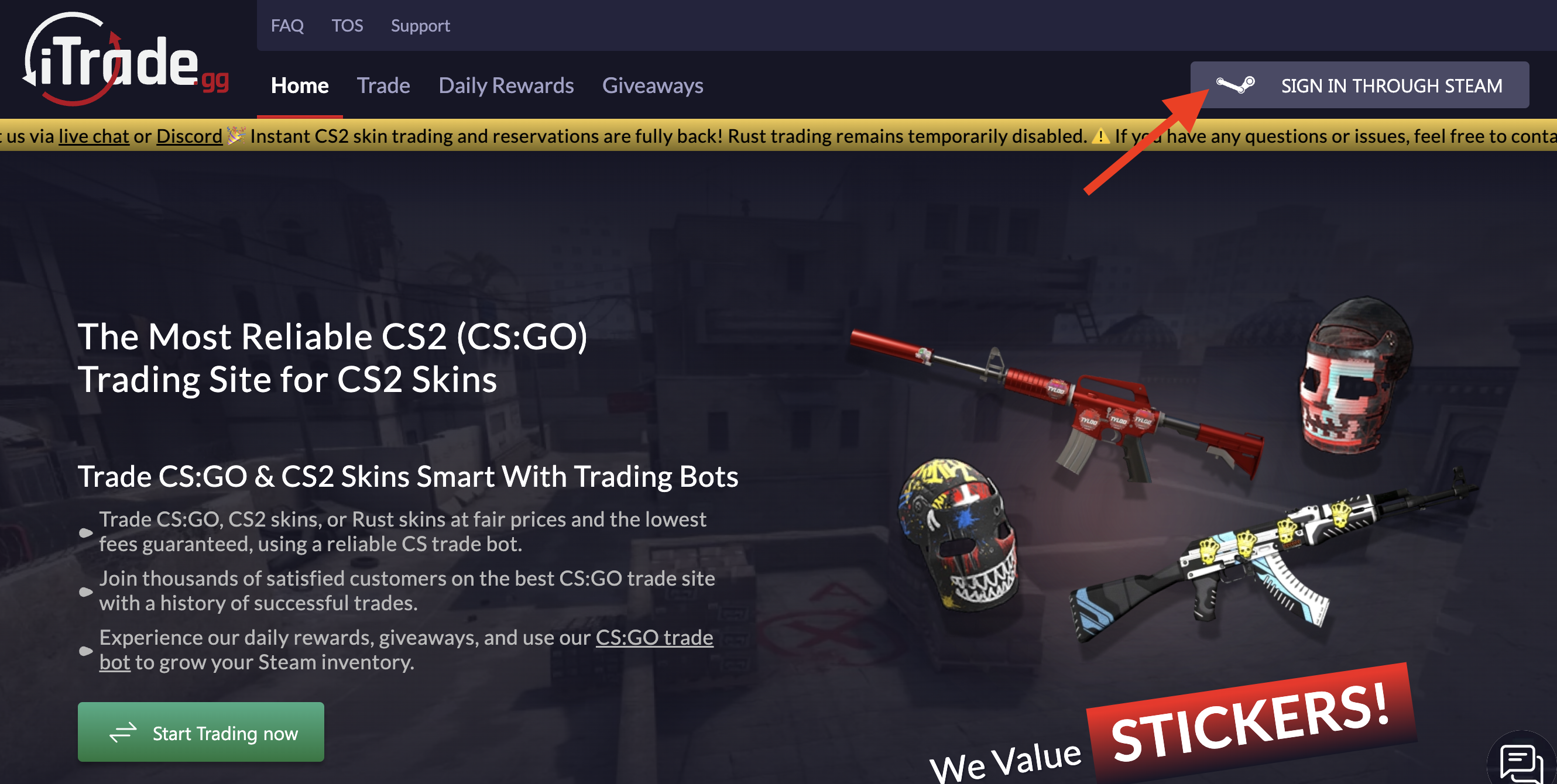
Go to iTrade.gg and click 'Sign In with Steam.' You'll authenticate through Steam's official page, which connects your skin inventory to the platform. No separate password needed—just Steam OAuth.
-
2

Configure Trade URL
Find your Steam Trade URL in Steam account settings and paste it into your iTrade.gg profile. This link lets the platform send and receive items securely. One wrong character and trades fail, so double-check it.
-
3

Deposit Funds or List Skins
To start trading, either deposit funds (credit card, crypto) or list skins directly for sale/trade. Deposits hit you with a 2.9% + $0.25 processing fee, so factor that in. Crypto deposits avoid some fees but depend on blockchain confirmation times.
-
4
Complete Your First Transaction
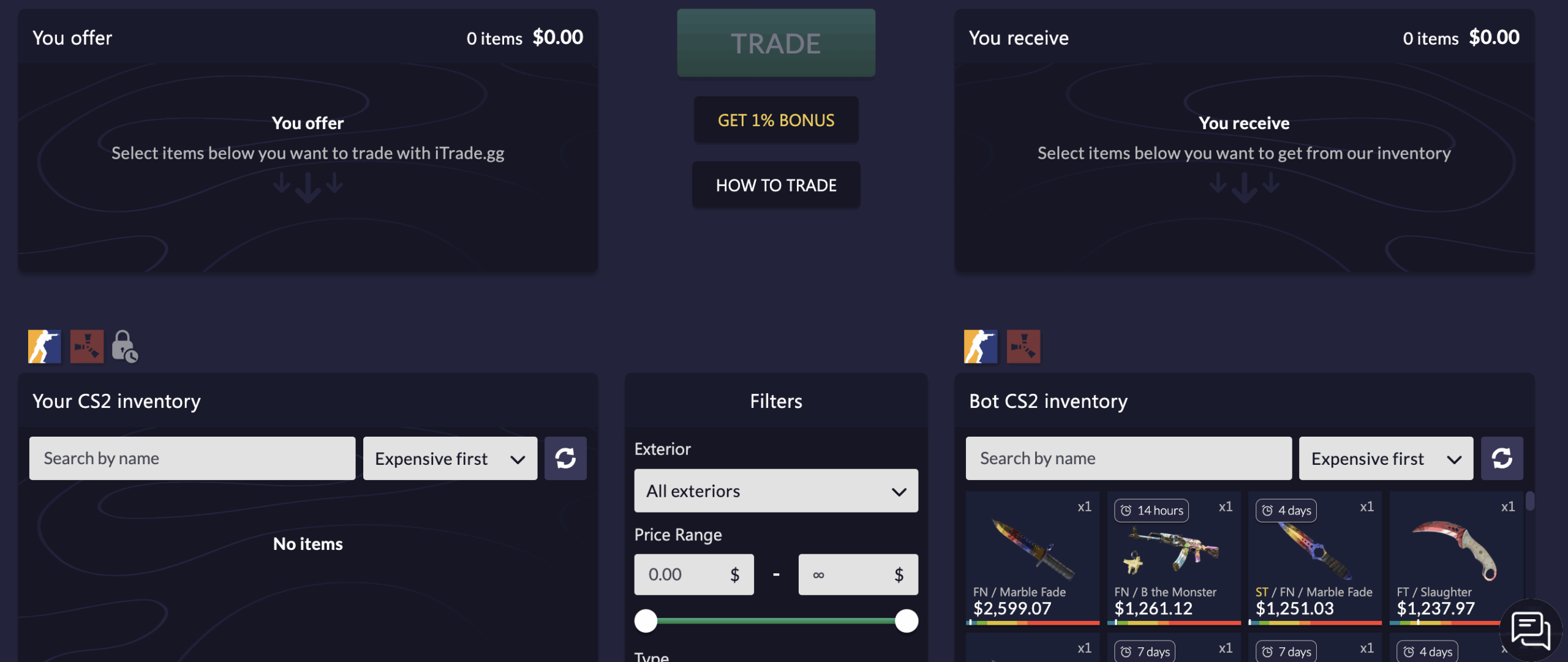
Browse available items or use instant-sell. Select your trade, confirm, and the system processes automatically. Trades execute fast—usually within seconds after Steam confirmation. No waiting for buyers, no manual approvals.
Security tip: Enable two-factor authentication on both Steam and iTrade.gg. Estonia-registered platforms operate with less oversight, so extra account security is on you.
FAQ About iTrade.gg
-
Is iTrade.gg legit and safe to use?
-
Can You Get Banned for Using iTrade.gg?
-
Does iTrade.gg Require KYC?
-
How Long Do Withdrawals Take?
-
Does iTrade.gg have a mobile app?