

 Very Low 1.90% seller fee

Quick Overview
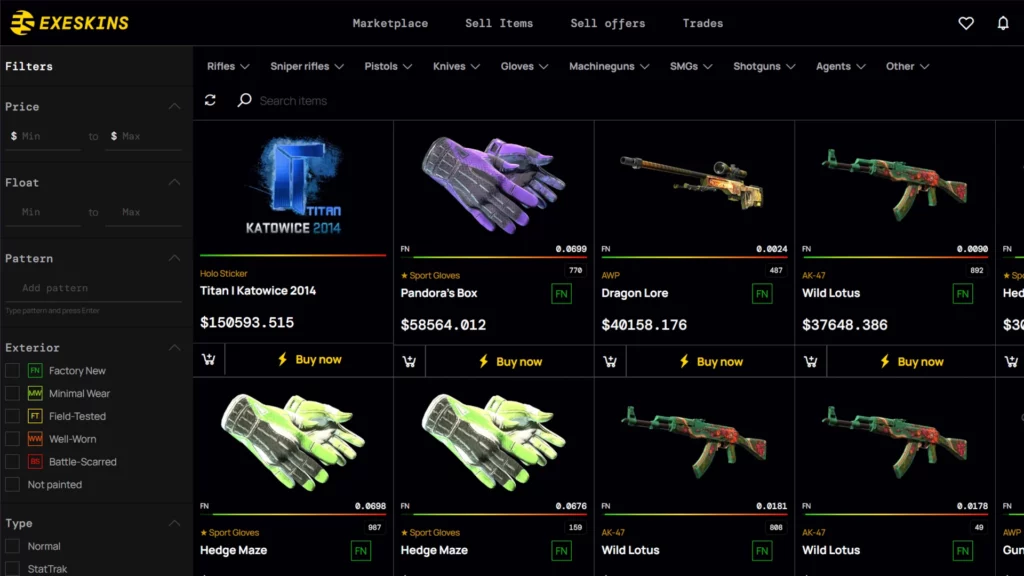
ExeSkins is a P2P CS2 skin marketplace based in Poland. It is aimed at users who want a large skin selection, low seller fees, and a simple marketplace setup for buying and selling skins with card or crypto payments. With around 2,000,000 skins listed for sale, ExeSkins stands out most for inventory size and low selling costs, while its smaller user base and limited extra features make it less attractive for users who want maximum liquidity or bonus perks.
Its strongest points are the 0% buyer fee, 1.90% seller fee, and a huge 2,000,000-skin inventory. On the other hand, it is still a relatively new marketplace with only 27,000 unique monthly users, no loyalty program, and no regular giveaways, so it may not appeal to users who prefer more established platforms with larger active communities.
Fees
ExeSkins has a simple fee structure compared to many other CS2 skin marketplaces. Buyers pay no marketplace fee at all, while sellers pay a low 1.90% fee. Extra costs mainly come from deposits and withdrawals, which depend on whether you use card payments or USDT.
| Fee Type | Cost | Details |
|---|---|---|
| Buyer Fee | 0% | No marketplace fee for buyers. |
| Seller Fee | 1.90% | Applies to marketplace sales. |
| Deposit Fee | 2.8% to 4.8% | Credit/Debit Cards: 4.8%. USDT (TRC20): 2.8%. |
| Withdrawal Fee | 1% + network fee | USDT (TRC20): 1% plus network fee. |
The biggest strength here is the combination of a 0% buyer fee and a 1.90% seller fee, which makes ExeSkins cost-efficient for normal marketplace use. USDT deposits are cheaper than card deposits at 2.8%, while withdrawals through USDT (TRC20) cost 1% plus the network fee.
Is ExeSkins Legit?
Yes, ExeSkins appears to be a legit CS2 skin marketplace, but it is still a relatively new one. It launched in 2024, which means it does not have the same long track record as older marketplaces, but it does already have a public Trustpilot profile with a 4.1 out of 5 rating based on 36 reviews.
Its reputation looks decent so far, though still limited. A small review count means the public trust profile is not as strong as more established competitors, and users who prefer long-established marketplaces may be more cautious because ExeSkins is still building its reputation.
There is no clear sign from the provided data that ExeSkins itself is a scam. Still, like with any third-party skin marketplace, the biggest risks are fake links, phishing pages, and compromised Steam accounts rather than the marketplace model itself. Users should always confirm the correct website, review every trade carefully, and secure their Steam account before using the platform.
Payment Methods at ExeSkins
ExeSkins keeps payments fairly simple. It supports card payments and USDT for deposits, while withdrawals are handled through USDT on the TRC20 network. That makes it easy enough for buyers, but less flexible for sellers who want fiat withdrawal options.
| Payment Method | Deposit | Withdraw | Details |
|---|---|---|---|
| Credit/Debit Card | Yes | No | Available for deposits with a 4.8% fee. |
| USDT (TRC20) | Yes | Yes | Deposit fee: 2.8%. Withdrawal fee: 1% + network fee. |
The payment setup is easy to understand, but it is not very broad. USDT is the more flexible and cheaper option for both deposits and withdrawals, while users who prefer bank withdrawals or other fiat payout methods may find ExeSkins too limited.
Final Verdict: Is It One of the Best Places to Buy CS2 Skins?
ExeSkins is a promising option for users who care about low marketplace fees and very large inventory. With 2,000,000 skins listed, a 0% buyer fee, and a 1.90% seller fee, it offers strong value on paper and could suit users who are comfortable trying a newer platform.
It is best for fee-conscious users and buyers who want a large selection of skins. It is less ideal for users who prefer long-established marketplaces, more advanced features, or more withdrawal options. Overall, ExeSkins can be worth considering among the best sites to buy CS2 skins, but its short operating history means more cautious users may still prefer older and more proven alternatives.
How To Get Started with ExeSkins
Getting started with ExeSkins is straightforward. You need a Steam account to use the marketplace, and if you plan to sell skins or withdraw funds, you should also be ready to complete any account verification steps the platform may require.
Steam Account
CS2 Skins
-
1
Create Your Account
Sign up on ExeSkins and connect your Steam account. This allows the platform to link your inventory and process trades correctly.
-
2

Add Your Trade Details
Set up your Steam trade link so skins can be sent and received without issues. Accurate account details are essential for smooth marketplace use.
-
3
Choose Whether You Want to Buy or Sell
Browse the marketplace if you want to buy skins, or list your items if you want to sell. Since ExeSkins uses a P2P model, users should review listings carefully before completing transactions.
-
4

Deposit Funds
Add funds using either a credit or debit card or USDT on TRC20. Before depositing, check the total payment cost because card deposits cost 4.8%, while USDT deposits cost 2.8%.
-
5
Set Up Withdrawals
If you plan to cash out, prepare a USDT wallet on the TRC20 network. ExeSkins charges a 1% withdrawal fee plus the network fee, so users should factor that into their final payout amount.
FAQ About ExeSkins
-
Is Exeskins legit?
-
Can You Get Banned for Using ExeSkins?
-
Does ExeSkins Require KYC?
-
How Long Do Withdrawals Take?




Average User Rating 0.0


Write your own review: