

 Fast, no-listing cashouts — instant quotes and direct payouts







Quick Overview
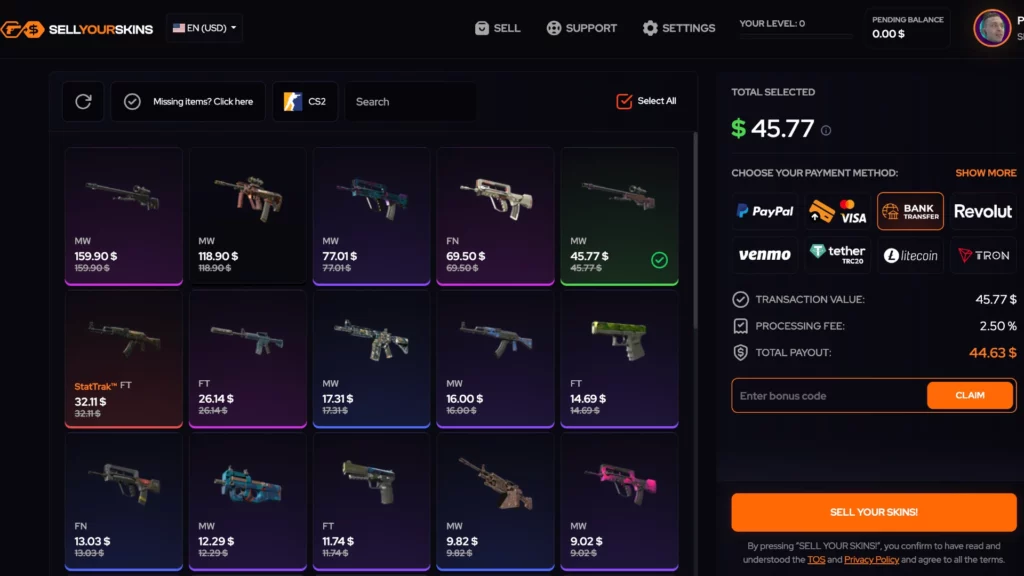
SellYourSkins is a CS2 skin marketplace that focuses on instant skin sales, allowing players to quickly convert their Counter-Strike 2 skins into real money. Instead of waiting for another user to buy your item, the platform purchases skins directly from players and pays out through several supported payment methods.
Launched in 2020, SellYourSkins has built a reputation as a simple cashout service for players who want to sell skins fast. The platform mainly targets users who prefer instant payouts instead of listing items on peer-to-peer markets and waiting for buyers.
SellYourSkins supports several payout options including PayPal, credit or debit cards, bank transfers, SEPA, Revolut, Venmo, and cryptocurrency, making it convenient for users in many regions to cash out their skins.
The platform is best suited for:
- players who want to sell CS2 skins instantly for cash
- users looking for fast payouts instead of marketplace listings
- traders who prefer simple selling without managing listings
- players who want multiple cash withdrawal options
SellYourSkins typically pays around 80% of the skin’s cash value when selling items instantly, which is common for instant cashout services. In addition, new users receive a 3% bonus when selling items, slightly increasing the payout for first-time sellers.
Fees
SellYourSkins has a straightforward fee structure because the platform focuses on instant skin sales rather than a traditional marketplace with buyers and sellers. Instead of charging listing or buyer fees, the cost is reflected in the instant sell payout rate.
Below is an overview of the main fees and payout structure on SellYourSkins.
| Fee Type | Amount | Details |
|---|---|---|
| Trading Fee | N/A | No peer-to-peer or bot trading system |
| Instant Sell | ~80% value | Average Skin value receive by the sellers. |
| Deposit Fee | N/A | Deposits are impossible on this website. |
| Withdrawal Fee | 0.5% - 2.5% | Depends on the withdrawal method |
The instant sell payout is around 80% of the skin’s cash value, which is typical for quick cashout services. This means users trade a small portion of the skin’s value in exchange for receiving money immediately without waiting for a buyer.
Withdrawal fees range between 0.5% - 2.5% depending on the payment method, such as PayPal, bank transfer, or crypto.
New users also receive a 3% selling bonus, which slightly increases the payout when selling skins for the first time on the platform.
Is SellYourSkins Legit?
Yes, SellYourSkins is generally considered a legitimate platform for selling CS2 skins instantly. The site has been operating for several years and has built a reputation as a simple service for players who want to cash out skins without listing them on a marketplace.

- Years in operation: SellYourSkins launched in 2020, which gives the platform several years of operating history in the CS2 skin trading space. While it is not one of the oldest services, it has remained active and maintained steady usage.
- Community reputation: The platform focuses specifically on instant skin selling, which attracts users who want fast payouts rather than waiting for buyers. With around 65600 monthly visits, it maintains a smaller but active user base.
- Trustpilot score: SellYourSkins currently holds a 4.5 Trustpilot rating based on more than 281 reviews, indicating strong user satisfaction with the platform.
- Reddit feedback: Discussions on Reddit and CS trading communities generally describe SellYourSkins as a convenient service for quick skin sales. Users typically mention the fast payouts and multiple withdrawal options as the main advantages.
- Known scams associated with the marketplace: Most reported scams connected to skin marketplaces involve fake phishing websites or impersonation trade offers, not the official platform itself. As with any trading site, users should verify the correct website URL and confirm all Steam trade offers before accepting them.
Overall, SellYourSkins appears to be a reliable instant cashout platform for CS2 skins, especially for players who want to quickly convert skins into cash through supported payment methods.
Payment Methods at SellYourSkins
SellYourSkins supports several payout options that allow users to receive money after selling their skins. Since the platform focuses on instant skin cashouts, the main purpose of these payment methods is to transfer funds to the seller after the skin sale is completed.
Below is an overview of the payment methods supported on SellYourSkins.
| Payment Method | Deposit | Withdraw | Details |
|---|---|---|---|
| PayPal | No | Yes | Popular payout option for fast withdrawals |
| Credit / Debit Card | No | Yes | Funds can be transferred to supported cards |
| Bank Transfer | No | Yes | Direct withdrawal to bank accounts |
| SEPA | No | Yes | Available for users in supported European regions |
| Revolut | No | Yes | Fast payout option through Revolut accounts |
| Venmo | No | Yes | Available for supported users |
| Cryptocurrency | No | Yes | Crypto payouts available for supported coins |
Because SellYourSkins works as an instant sell platform, users do not deposit funds to buy skins. Instead, they send skins through a Steam trade offer, and the platform pays out the corresponding cash value after the trade is completed.
Withdrawal fees typically range between 0.5% - 2.5% depending on the payout method, so users should review the selected payment option before completing the transaction.
Final Verdict: Is It One of the Best Places to Sell CS2 Skins?
SellYourSkins is designed specifically for players who want to sell CS2 skins quickly and receive real money payouts without waiting for buyers. Instead of listing skins on a marketplace, the platform allows users to sell items instantly and receive payment through several supported payout methods.
One of the biggest advantages of SellYourSkins is the speed and simplicity of the process. Users only need to select skins from their Steam inventory, accept the trade offer, and choose how they want to receive the payout. Supported payout options include PayPal, bank transfer, SEPA, Revolut, Venmo, credit or debit cards, and cryptocurrency, giving users many ways to cash out their skins.
The platform usually offers around 80% of the skin’s cash value, which is typical for instant sell services. New users also receive a 3% bonus when selling items, slightly increasing the payout for their first transaction.
However, SellYourSkins is not designed for trading or browsing large inventories of skins. Players who want to buy skins, compare listings, or hunt for rare items may prefer traditional skin marketplaces instead.
SellYourSkins is a good choice for:
- players who want to sell CS2 skins instantly for cash
- users who prefer fast payouts instead of marketplace listings
- players who want multiple withdrawal methods
SellYourSkins may not be ideal for:
- traders looking to buy or trade CS2 skins
- players searching for rare skins or specific float values
- users who prefer peer-to-peer marketplaces
Overall, SellYourSkins is a convenient option for players who want a straightforward way to sell CS2 skins, especially when speed and easy cash withdrawals are more important than getting the highest possible marketplace price.
How To Get Started with SellYourSkins
Getting started with SellYourSkins is simple because the platform is designed for instant skin selling rather than marketplace trading. You only need a Steam account with tradable skins and a payment method where you want to receive the payout.
Steam Account
CS2 Skins
-
1

Sign In with Your Steam Account
Visit the SellYourSkins website and click Sign in with Steam. This connects your Steam account so the platform can access your Steam inventory and trade link to process the sale.
-
2

Select the Skins You Want to Sell
After logging in, the platform will display skins from your inventory that are eligible for sale. Choose the skins you want to sell and review the instant payout price offered for each item.
-
3
Choose Your Payout Method
Next, select how you want to receive the money. SellYourSkins supports several payout options including PayPal, bank transfer, SEPA, Revolut, Venmo, credit or debit cards, and cryptocurrency.
-
4

Confirm the Trade Offer
Once you confirm the sale, the platform sends a Steam trade offer to your account. Accept the trade to transfer the skins to the platform.
-
5

Receive Your Payment
After the trade is completed, SellYourSkins processes the payout using the selected payment method. Depending on the method, the funds may arrive within minutes or take longer depending on the payment provider.
After completing these steps, you can return to the platform anytime to sell more skins or check new offers for items in your Steam inventory.
Alternatives to SellYourSkins
While SellYourSkins is useful for instant skin cashouts, it is not the only platform that allows players to quickly sell CS2 skins. Several other marketplaces offer similar services, including instant sell options, bot trading, or fast payouts.
Some platforms focus on higher instant sell percentages, while others provide peer-to-peer trading where you may get better prices but need to wait for a buyer.
Below are several CS2 skin markets that work as good alternatives to SellYourSkins.
| Marketplace | Type | Instant Sell Value | Key Feature | Withdraw Methods |
|---|---|---|---|---|
| Tradeit.gg | Bot marketplace | ~83% of skin value | Fast trading and instant sell system | Crypto, Bank transfer, SEPA, Revolut |
| Skinflow | Trading marketplace | ~80% of skin value | Instant sell and regular giveaways | Crypto, PayPal, Payoneer |
| Lis-Skins | Marketplace | Up to ~90% of value | Strong instant sell rates | Crypto, Bank transfer, CS2 skins |
| Avan.market | Trading marketplace | ~89% of value | High instant sell payout rate | Crypto, Bank transfer, PayPal |
These platforms provide similar functionality for players who want to sell CS2 skins quickly instead of waiting for marketplace buyers. When comparing instant sell services, it is useful to check payout percentages, withdrawal fees, and supported payment methods to determine which platform offers the best value for your skins.
FAQ About SellYourSkins
-
Is Sellyourskins legit?
-
Can You Get Banned for Using SellYourSkins?
-
Can I buy skins here?
-
Is there a mobile app?
-
How Long Do Withdrawals Take?
-
Can You Trade on SellYourSkins?

Average User Rating 0.0


Write your own review: